
Best RPA Tools in 2026: Complete Automation Guide
In 2026, Robotic Process Automation (RPA) remains a key driver of operational efficiency and digital transformation. Selecting the right RPA platform for intelligent automation is critical for organizations that want to reduce manual workloads, streamline processes, and scale effectively. This guide explores leading automation solutions, including Q3edge, AutomationEdge, UiPath, Blue Prism, Automation Anywhere, Microsoft Power Automate, and WorkFusion, to help enterprises identify the solution that best aligns with their automation strategy and growth objectives.
What is RPA?
Robotic Process Automation (RPA) is a software-based automation technology that enables organizations to execute repetitive, rule-driven tasks through digital workers known as bots. These bots replicate human interactions with applications, systems, and user interfaces—without modifying underlying IT infrastructure.
RPA can handle structured, high-volume processes such as data entry, transaction processing, report generation, reconciliation, and system-to-system data transfers. Modern RPA platforms have evolved far beyond basic task automation and now serve as foundational components of enterprise-wide intelligent automation strategies.
- Next-Generation RPA Capabilities
- Integrated AI and Generative AI (GenAI) Features
- Smart Document Processing and Data Extraction
- Natural Language Processing and Understanding
- Predictive and Data-Driven Analytics
- Seamless Multi-System and Cross-Platform Connectivity
- Cloud-First, Scalable Architecture
Key Characteristics of Modern RPA Tools
Next-generation Robotic Process Automation platforms have moved beyond simple rule execution and now incorporate Artificial Intelligence (AI), Machine Learning (ML), and Generative AI (GenAI) capabilities.
For example, a GenAI-powered chatbot can interact conversationally with users, interpret intent, search enterprise knowledge bases, resolve employee queries, and even manage incident tickets. AI and ML components enable bots to move from rigid task execution to contextual decision-making. They can extract and interpret data from unstructured documents—such as emails, PDFs, contracts, or forms—without requiring predefined templates for every document type. This significantly expands automation coverage across complex business processes.
Core Characteristics of Modern RPA Platforms
- Rule-Driven Execution
RPA bots operate based on defined business logic, workflows, and conditional rules to execute structured, repeatable tasks with high accuracy.
- User Interface-Level Automation
Bots interact with applications via the presentation layer (UI), replicating human actions such as clicking, typing, copying data, and navigating screens.
- Non-Disruptive Implementation
RPA operates without altering underlying systems, databases, or application code, making it suitable for legacy environments.
- Elastic Scalability
Digital workers can be scaled up or down based on transaction volumes, seasonal demand, or business growth requirements.
- Operational Cost Optimization
By automating repetitive, labor-intensive activities, organizations reduce manual effort, minimize errors, and lower overall operational expenses.
- Prebuilt Connectors and Adapters
Modern RPA tools provide connectors for ERP, CRM, HRMS, finance systems, databases, and cloud platforms, accelerating integration.
- API and System Integrations
Beyond UI automation, advanced platforms support REST/SOAP APIs and event-driven integrations, enabling more resilient and scalable automation architectures.
What is an RPA Tool?
An RPA tool is a software platform designed to build, deploy, and control software bots that automate business processes. It provides a structured development environment where users can design automation workflows—typically using a visual, low-code or drag-and-drop interface—without extensive programming expertise.
In addition to bot development, RPA tools include orchestration and governance features such as bot scheduling, workload distribution, performance monitoring, logging, security controls, and centralized management. This enables organizations to scale automation initiatives while maintaining visibility, compliance, and operational stability.
Why Implement RPA Tools? Key Benefits for Businesses
Adopting RPA tools allows businesses to take repetitive, time-consuming tasks off employees’ plates and hand them over to software bots. This not only reduces manual errors but also speeds up day-to-day operations.
In 2026, companies that embrace intelligent automation are able to make decisions faster, improve overall efficiency, and lower operational costs. More importantly, automation gives employees the freedom to focus on higher-value, strategic work instead of routine administrative tasks—driving both productivity and innovation across the organization.
- Higher Productivity: Software bots complete repetitive, rule-based tasks significantly faster than manual execution, accelerating overall process throughput.
- Lower Operating Costs: Automating labor-intensive activities reduces dependency on manual effort, helping organizations optimize resource allocation and control expenses.
- Improved Accuracy: Bots follow predefined logic consistently, minimizing human errors and ensuring reliable, standardized outputs.
- Flexible Scalability: Automation can be expanded or reduced quickly to align with changing business volumes and growth requirements.
- Stronger Compliance and Governance: Built-in logging and audit trails help maintain regulatory compliance and provide full process transparency.
- Data-Driven Intelligence: Integration with AI, GenAI, and analytics capabilities enables deeper insights, smarter forecasting, and more informed decision-making.
RPA Tools Comparison
This listicle is designed for organizations evaluating a switch from their current automation platform, as well as for first-time buyers exploring RPA solutions for the first time.
1. Q3edge
1. Platform Capabilities
Q3edge offers an integrated digital transformation platform that combines Business Process Management (BPM), Robotic Process Automation (RPA), and AI-driven automation within a unified ecosystem.
Advanced capabilities include:
- AI-powered workflow automation
- Intelligent document processing
- Rule-based and cognitive automation
- Enterprise-grade API integrations
- Process orchestration across departments
The platform is designed to connect systems, data, and people seamlessly across enterprise environments.
2. Performance & Scalability Strengths
Q3edge is built with a scalable architecture that supports enterprise-grade workloads and growing automation demands.
| Capability | Description | Business Impact |
| Parallel Workflow Execution | Executes multiple process instances simultaneously | Improved throughput and faster cycle times |
| Batch Data Processing | Handles large transaction volumes efficiently | Significant reduction in processing time |
| Cloud-Optimized Architecture | Designed for scalable deployments | Lower infrastructure overhead and better performance |
This architecture enables organizations to scale automation initiatives without compromising stability or performance.
3. Extensible & Unified Automation Platform
Q3edge supports a wide range of automation and integration capabilities:
- RPA and BPM-led automation
- API-based system integrations
- AI, ML, and GenAI-enabled workflows
- Intelligent document processing
- Front-office and back-office automation
The platform eliminates the need for multiple disconnected tools by offering end-to-end automation within a single framework, helping organizations reduce complexity and total cost of ownership.
4. Licensing & Deployment Flexibility
Licensing Approach
- Transparent, usage-aligned pricing
- Flexible commercial models based on business requirements
- Cost-effective scaling as automation expands
Deployment Options
- On-premises deployment
- Cloud deployment
- Hybrid infrastructure support
This flexibility allows enterprises to align automation strategy with IT governance, compliance requirements, and budget planning.
5. Automation Development & Ease of Use
| Feature | Description |
| Visual Process Designer | Drag-and-drop interface for workflow creation |
| Low-Code/No-Code Environment | Enables business users to design automations |
| Advanced Developer Tools | Supports scripting and custom integrations |
| Training & Support | Structured onboarding, documentation, and enablement programs |
Q3edge balances ease of use for business teams with technical depth for developers.
6. Pre-Built Connectors & Accelerators
- Library of ready-to-use connectors for enterprise applications
- API-based integration framework
- Reusable automation components
- Accelerators for common industry processes
These capabilities significantly reduce implementation timelines and development effort.
7. Customer Success & Delivery Model
| Focus Area | Value Delivered |
| Outcome-Driven Automation | Emphasis on measurable business ROI |
| Global Delivery Capability | Cross-region implementation support |
| Migration & Modernization Support | Structured approach for legacy RPA transition |
| Dedicated Account Management | Ongoing customer engagement and governance |
| Partner Ecosystem | Collaborative implementation with technology partners |
2. UiPath – Platform Strengths Explained Simply
One of the biggest strengths of the UiPath platform is how easy it makes automation for both beginners and experienced developers.
- Process discovery and documentation tools: Built-in capabilities such as task capture help automatically record and document workflows, making automation design faster and more accurate.
- Visual, low-code bot builder: An intuitive drag-and-drop designer enables users to create automation workflows with minimal coding effort.
- Centralized orchestration and control: A unified management console allows scheduling, monitoring, and governance of bots across the enterprise.
- Comprehensive learning ecosystem: Access to structured training programs, certifications, documentation, and a community edition for hands-on practice.
- Advanced AI and cognitive integrations: Seamless connectivity with leading AI and machine learning technologies to enable intelligent automation use cases.
- Flexible commercial and deployment models: Supports cloud, on-premises, and hybrid environments with pricing options suited for organizations of different sizes.
3. Blue Prism
The strengths of the Blue Prism RPA platform include:
- Enterprise-grade, scalable architecture: Designed to support large-scale automation initiatives with high reliability and performance.
- Object-oriented design framework: Enables the creation and reuse of process components (objects), improving development efficiency and maintainability.
- Centralized release and version management: Provides structured control over deployments, updates, and version tracking across environments.
- Visual process designer: Offers a drag-and-drop interface to model and configure automation workflows with clarity and control.
- Strong governance and security focus: Built-in controls ensure compliance, role-based access, and enterprise-level security standards.
4. Automation Anywhere – Platform Strengths
- User-friendly bot development: An intuitive interface enables users to build automation workflows with minimal or no coding expertise.
- Centralized control with distributed execution: A scalable architecture supported by a centralized Control Room allows efficient bot deployment, monitoring, and governance.
- Built-in macro recording: Users can record repetitive on-screen actions and quickly convert them into automated tasks.
- Enterprise-grade security and compliance: Certified under standards such as SOC 1, SOC 2, and ISO 27001, ensuring strong data protection and regulatory alignment.
- AI-powered document automation (IQ Bot): Cognitive capabilities enable intelligent extraction and processing of semi-structured and unstructured documents.
- Extensive partner ecosystem: A broad global network of partners supports implementation, integration, and scaling across industries.
- Strong presence in regulated sectors: Widely adopted in industries such as financial services, where compliance, governance, and auditability are critical.
5. Microsoft Power Automate – Platform Strengths
- Seamless Microsoft ecosystem integration: Deep connectivity with Microsoft 365, Dynamics, Teams, SharePoint, and other Microsoft services ensures smooth data flow and unified automation experiences.
- User-friendly experience: A guided, low-code interface with pre-built templates and ready-to-use connectors makes it easy for business users to create workflows quickly.
- Cost advantage for Microsoft customers: Competitive pricing, particularly beneficial for organizations already invested in Microsoft licensing and infrastructure.
- Strong cloud foundation: Built on Microsoft Azure, offering reliable cloud scalability, security, and enterprise-grade performance.
AutomationEdge – What Makes It Different?
AutomationEdge stands out because it brings multiple types of automation together in one single platform. Instead of buying separate tools for IT automation, business process automation, AI, and integrations, companies can manage everything from one place. This makes automation simpler, faster to deploy, and easier to manage.
Here’s what makes it different in simple terms:
- All-in-One Automation Platform
AutomationEdge can handle IT tasks, business workflows, data transfers (ETL), API integrations, machine learning models, NLP, and even GenAI-based processes — all without needing separate systems. This means fewer tools to manage and fewer integration headaches.
- Faster Performance with Parallel Processing
Its technology allows one bot to perform multiple tasks at the same time. It can also process large volumes of data much faster than traditional bots — in some cases up to 100 times faster. The result? Work gets done quicker, and overall automation time is reduced significantly.
- 750+ Ready-to-Use Plugins
AutomationEdge offers hundreds of pre-built connectors that work with popular enterprise applications. This reduces development time and helps companies go live faster without building everything from scratch.
- Simple and Cost-Effective Licensing
Unlike many RPA vendors that charge for multiple components, AutomationEdge charges mainly for the bot. This transparent pricing model can reduce total automation costs by up to 50%, making it easier for businesses to scale.
- GenAI-Powered Smart Automation
With GenAI chatbots and intelligent document processing, AutomationEdge can understand natural language, answer employee queries, and extract information from documents automatically. This makes automation smarter and more human-like.
- One Universal Agent for Everything
Instead of running different agents for different tasks, AutomationEdge uses a single flexible agent that can handle RPA, IT automation, data processing, API automation, and more. This simplifies management and improves efficiency.
Conclusion
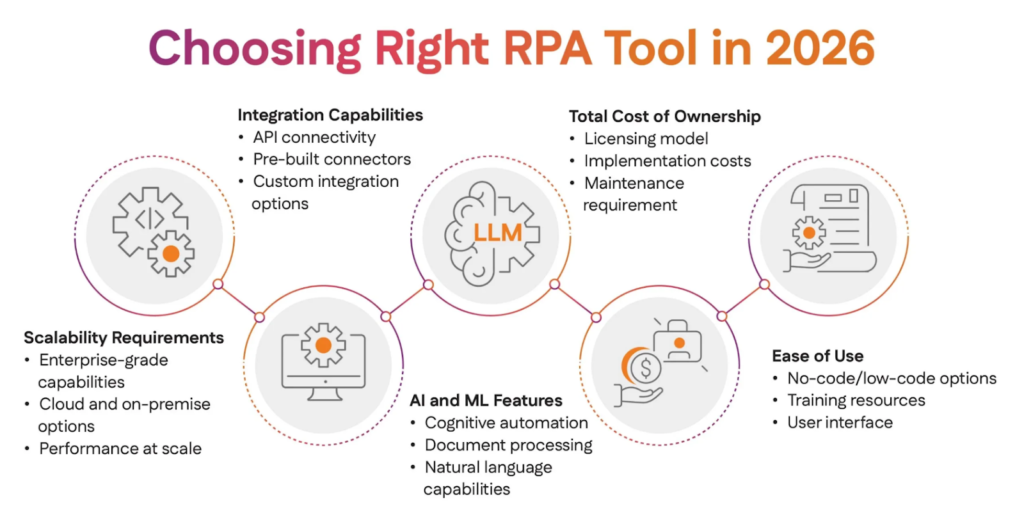
Choosing the right RPA automation tool is not just about popularity—it’s about finding the solution that fits your organization’s goals, scale, and budget. Every platform has its strengths. Some excel in enterprise governance, others in ecosystem integration, while platforms like Q3edge stand out for their cost efficiency and broad, advanced capabilities within a unified environment.
Ultimately, the best RPA tool is the one that aligns with your digital transformation roadmap and can grow with your business. It should offer flexibility, scalability, and the ability to adapt to emerging technologies such as AI and GenAI. Carefully compare each platform’s capabilities against your operational requirements to make a strategic decision that supports long-term automation success.